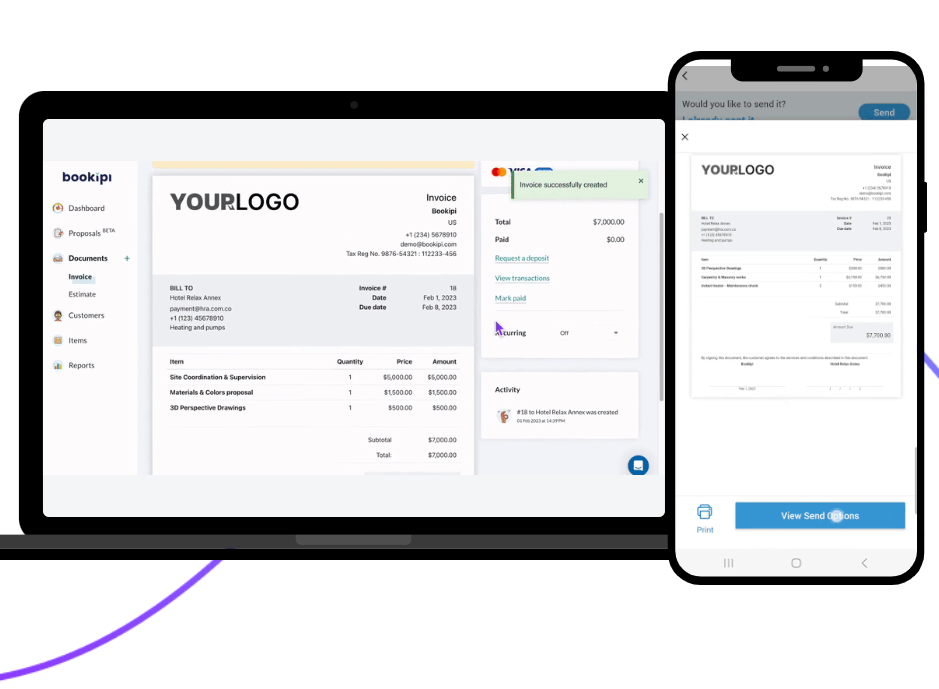
How to download subscription invoices
Learn how to view and download invoices for your Bookipi web subscriptions.
How to download subscription invoices Read More »
Learn how to view and download invoices for your Bookipi web subscriptions.
How to download subscription invoices Read More »
Learn how to update the card payment details for your Bookipi Web subscriptions.
How to update your billing information for subscriptions Read More »
Learn how to sign up for a Bookipi Invoice Web subscription to create unlimited invoices in Bookipi Invoice
How to subscribe for unlimited invoices on web Read More »
A licensed plumber in California is required to provide a written contract or estimate whenever he or she undertakes any plumbing project valued at at least $500. This is in addition to the law that requires a written estimate for the entire project. Learn more about contracts: Wikipedia What documents do I need to provide
Do I legally have to quote a plumbing job in California? Read More »
Read up on our FAQs for Bookipi Invoice Web Subscriptions
Bookipi Web App Subscriptions FAQs Read More »
What is a Value Added Tax (VAT) invoice? A Value Added Tax (VAT) invoice is a legally required document for any VAT-registered UK business that makes a taxable supply to another business or customer in the UK. A VAT-registered business in the UK must provide VAT invoices including the amount of VAT charged or paid
What are VAT invoices and who needs them? Read More »
Small business owners need to be aware of their tax liabilities so that they can stay on top of their financial obligations. Follow our 2023 tax checklist below which includes important deadlines and requirements you should be aware of. Organize your records Keep a record of all your financial transactions and records, including receipts, invoices,
Tax Checklist 2023 for small businesses Read More »
The success of any small business relies heavily on the accuracy of the financial records you keep to keep track of all your business transactions. To help you manage your finances effectively, we have put together a list of six bookkeeping tips you should consider: Tip 1: Separate your business and personal finances To make
6 Bookkeeping tips for small businesses Read More »
With Bookipi Invoice, you can make an invoice quickly and easily. The following steps will guide you through the process. Invoice examples See an example of an invoice made using Bookipi below. How to make an invoice on Bookipi Step 1: Sign up for a Bookipi account Sign up for a free Bookipi invoice maker account .
How to create an invoice with Bookipi for your small business Read More »
Learn how to edit a deposit request in Bookipi Invoice Web App
How to edit a deposit request Read More »
Learn how to attach a photo to your invoices on Bookipi Invoice Web V2
How to attach a photo to an invoice on the Web App Read More »
Learn how to request a deposit on Bookipi Invoice Web v2
How to request a deposit Read More »
Learn how to remove the due date on an invoice in Bookipi Invoice Web App
How to remove the due date on invoices on the Web App Read More »
Learn how to turn on and add overdue reminders on Bookipi Invoice Web
How to add overdue reminders on the Web App Read More »
Learn how to turn off accepting card payments in Bookipi Invoice Web v2.
How to turn off card payments on Web Read More »
Learn how to turn off Bookipay in Bookipi Invoice Web v2
How to turn off Bookipay Read More »
Learn how to end a recurring invoice on Bookipi Invoice Web v2.
How to end a recurring invoice Read More »
Learn how to edit a recurring invoice in Bookipi Invoice Web App
How to edit a recurring invoice Read More »
Learn how to create an invoice that repeats in Bookipi Invoice Web v2
How to create a recurring invoice Read More »
Learn how to request a signature from your customers on Bookipi Web
How to request a signature from customers Read More »
Learn how to edit your business signature on Bookipi Invoice Web App
How to edit your signature in invoices Read More »
Learn how to add a signature to your invoices in Bookipi Invoice Web v2.
How to add a signature to invoices Read More »
Learn how to find the email address you used to set up your account on the Bookipi Invoice mobile app.
How to find your Invoice Mobile App email Read More »
Learn how to reset your password on the Bookipi Invoice Mobile App
How to reset your password Read More »
Learn how to set up your password on the Bookipi Invoice mobile app.
How to set up your password Read More »
Learn how to verify your Bookipi Invoice account on mobile app.
How to verify your account Read More »
Learn how to create an account on the Bookipi Invoice Mobile App
How to create an account Read More »
Learn how to activate card payments on Bookipi Invoice Web v2
How to activate payments on web Read More »
Read our frequently asked questions (FAQ) for accepting card payments on Bookipi Invoice
Accepting Card Payments FAQ Read More »
There is a buyer and seller in every business transaction. The seller may be a freelancer or business that provides goods or services to a customer for a fee. It’s this transaction that brings up questions. How do you make an invoice? How much money does the buyer owe? What exactly are they paying for?
What is an invoice? Read More »
Learn how to refund a customer on Stripe and reissue an invoice in Bookipi Invoice Web v2
How to refund customers on Stripe and reissue invoices Read More »
Learn how to filter proposals with Bookipi Proposals.
How to filter proposals Read More »
Learn how to set the tax on future invoices permanently in Bookipi Invoice Web v2
How to set the tax on future invoices Read More »
Learn how to send a proposal to multiple people in Bookipi Proposal.
How to send a proposal to multiple people Read More »
Learn how to resend a proposal in Bookipi Proposals
How to resend a proposal Read More »
Learn how to update a customer’s bank details in a Bookipi Proposal
How to update customer bank details on proposals Read More »
Learn how to set and edit the terms and conditions in Bookipi Proposals.
How to set the terms and conditions for proposals Read More »
Learn how to set and edit the contract length of a proposal in Bookipi Proposals.
How to set contract length of proposals Read More »
Learn how to edit and set the proposal expiry date for future proposals in Bookipi Proposals
How to edit and set the proposal expiry date for future proposals Read More »
Learn how to terminate an accepted proposal in Bookipi Proposals
How to terminate an accepted proposal Read More »
Learn how to complete a proposal that has been accepted by your customer in Bookipi Proposals
How to complete an accepted proposal Read More »
Learn how to delete or remove a proposal in Bookipi Proposal
How to delete a proposal on the Web App Read More »
Learn how to duplicate a proposal in Bookipi Web App
How to duplicate a proposal on the Web App Read More »
Learn how to mark a proposal as declined in Bookipi Proposals.
How to mark a proposal as declined Read More »
Learn how to revoke, edit and resend a proposal in Bookipi Proposals
How to revoke, edit and resend a proposal Read More »
Learn how to save a finished proposal without sending it in Bookipi Proposals
How to save a finished proposal Read More »
Learn how to save a draft proposal in Bookipi Proposals
How to save a draft proposal Read More »
Learn how to create a new proposal in Bookipi Proposals
How to create a proposal Read More »
Learn how to activate proposals in Bookipi Proposals
How to activate proposals Read More »
Learn about Bookipi Proposals, brought to you by Bookipi Invoice. We cover frequently asked questions
Bookipi Proposals FAQ Read More »
Learn how to add bank details in the Notes section of other document types on Bookipi Web V2.
How to add bank details as notes on the Web App Read More »
Learn how to add your bank payment details on invoices to allow customers to pay you directly.
How to add bank payment details to invoices Read More »
Learn how to send invoices straight from Gmail using the Bookipi Invoice Gmail add-on
How to send invoices from Gmail Read More »
Learn how to use wallets and add expenses in Bookipi Expense app
How to use wallets and add expenses Read More »
Learn how to transfer between wallets on Bookipi Expense mobile app
How to transfer between wallets Read More »
Learn how to change the currency of a wallet on Bookipi Expense mobile app
How to change the currency of a wallet Read More »
Learn how to make a budget in Bookipi Expense mobile app
How to make a budget Read More »
Learn how to send an invoice as a PDF attachment in Bookipi Invoice mobile app.
How to send an invoice as a PDF Read More »
Learn how to automatically archive ‘Paid’ invoices in Bookipi Invoice mobile app
Auto Archive Paid invoices Read More »
Learn how to send an invoice in Bookipi Invoice mobile app.
How to send an invoice and mark as sent Read More »
Learn how to use Stripe for credit card payments on Bookipi Invoice mobile app
How to use Stripe for credit card payments Read More »
Here we will go over how to register for mini-websites
How to register for mini-websites Read More »
Learn how to create mini-websites in Bookipi Proposals
How to create mini-websites Read More »
Learn how to edit your mini website in Bookipi Mini Websites
How to edit your mini website Read More »
Learn how to create, send, edit and filter invoices on Bookipi Invoice Web v2.
How to create, send, edit and filter invoices Read More »
Learn how to set up your business on Bookipi Invoice Web v2
How to set up your business on web Read More »
Learn how to create, edit, copy and delete an item on Bookipi Invoice Web v2.
How to create, edit, copy and delete an item Read More »
Learn how to create, edit, copy and delete a customer in Bookipi Invoice Web v2.
How to create, edit, copy and delete a customer Read More »
Learn how to sign up to Bookipi Invoice Web v2
How to sign up to Bookipi Web v2 Read More »
Learn how to add another business in Bookipi Web app
How to add another business Read More »

Learn how to view a list of transactions from the calendar in the Cash flow feature
How to view a list of transactions in Cash flow Read More »
Learn how to sync your bank to the cashflow feature in Bookipi Invoice mobile app.
How to sync your bank Read More »
Learn how to view Profit and Loss totals for a selected date range in the Bookipi Invoice mobile app using the Cash flow feature.
How to View Profit and Loss Totals Read More »
Learn how to add an expense or income in Bookipi Invoice mobile app – cash flow feature
How to add an expense or income in cash flow Read More »
Learn how to add a photo of a receipt in Bookipi Invoice mobile app using the cash flow feature.
How to add a photo of a receipt Read More »
Learn how to add, edit and delete a customer on Bookipi Invoice mobile app.
How to add, edit and delete a customer Read More »
Learn how to create and send a customer statement on Bookipi Invoice mobile app
How to create and send a customer statement Read More »
Learn how to set up your company on the Bookipi Invoice mobile app.
How to set up your company Read More »
Learn how to convert an estimate to an invoice on the Bookipi Invoice mobile app.
How to convert an estimate to an invoice Read More »
Learn how to get a customer to sign an invoice in the Bookipi Invoice mobile app.
How to get a customer to sign an invoice Read More »
Learn how to rename document types, such as invoice, estimate, credit note, delivery note, and more, in the Bookipi Invoice mobile app.
How to rename the document type Read More »
Learn how to create a report in the Bookipi Invoice mobile app
How to create a report Read More »
Learn how to record a partial payment on invoices in the Bookipi Invoice mobile app.
How to record a partial payment Read More »
Learn how to turn off card payments on Bookipi Invoice mobile app
How to turn off card payments Read More »
Winning jobs and standing out from the competition is a constant battle that small business owners. You need more jobs and business opportunities to take your business to the next level. We’re super excited to announce that we’ve launched the BETA for our new business proposal maker. In this feature, you can make professional business proposals
New feature: Business Proposals (Beta) Read More »
To accept card payments for your invoices, you’ll need to connect to a payments platform like Stripe. Stripe is an online payments platform that you can use to accept online card payments. In this article, we’ll go over how Stripe works and the benefits it has for your business. What is Stripe? Stripe is an
What is Stripe? How does Stripe work? Read More »
Learn how to delete an item on the Bookipi Invoice mobile app
How to delete an item on the mobile app Read More »
Learn how to edit an item in the Bookipi Invoice mobile app
How to edit an item on the Mobile App Read More »
Learn how to add an item on the Bookipi Invoice mobile app
How to add an item on the Mobile App Read More »
Learn how to edit an invoice in Bookipi Invoice Web v2
How to edit an invoice on the Web App Read More »
Learn how to create and send an invoice in Bookipi Invoice Web (v2)
How to create and send an invoice on Web V2 Read More »
Pricing your products and/or services is difficult. If your prices are too high, you risk being seen as too expensive and your business won’t be competitive. Studies show that 60% of consumers prioritize affordability when choosing between similar products, making pricing a key factor in attracting customers. If your prices are too low, you risk
How to price your products and/or services Read More »
We’ve launched Bookipi Invoice on the Amazon Appstore! The Amazon Appstore Bookipi Invoice app has all the great features that you know and love, including: The Amazon Appstore is currently available on Android mobile devices and lets users save money on in-app purchases with Amazon Coins. You can manage all your apps and subscriptions in
Bookipi Invoice is available on the Amazon Appstore Read More »
Bookipi mini-websites are the perfect way to promote your small business for free and win you more work. With your mini-website, potential customers can find you on Google and contact you through your contact form. Getting discovered and having a website is just the first step to winning more clients. The next step is to
9 ways to make your mini-website stand out Read More »
To help you get the most out of Bookipi, we’ve added new video tutorials to our YouTube channel. These tutorials have been updated to reflect our most recent Bookipi update. The new video tutorials include: Check out all the new tutorials in the playlist below: More Bookipi Invoice tutorials for the easiest invoicing solution
Bookipi Invoice video tutorials (2021 update) Read More »
It’s simple to win new work from clients using Bookipi’s business proposal maker. Our business proposals are ideal for freelancers and small businesses in design, sales, consulting and more. Learn how to make a professional business proposal when pitching for new work with our simple user guide. Read our frequently asked questions around Bookipi proposals. Get the easiest small business tools
Business Proposals with Bookipi Read More »
We’ve updated our partnership with Tide to provide you with a new and exciting offer. With Tide, UK businesses can create a business bank account in a matter of minutes. To get you off to the best start, we’ll also give you £75 when you spend £100 on your Tide card within 30 days of opening your account!*
Open a business current account with Tide & Bookipi and get £75! Read More »
Managing cash flow can be hard when you’re a small business owner. Most small businesses owners are too busy to spend time tracking cash flow and the products that are meant to help them are too hard. To make this easier for our US users, we’ve launched a cash flow feature in Bookipi Invoice for
Cash flow summaries + bank feeds in Bookipi Invoice (available in US) Read More »
Managing cashflow can be hard when you’re a small business owner. Most small businesses owners are too busy to spend time tracking cash flow and the products that are meant to help them are too hard. To make this easier for our users, we’re launching a new cash flow feature in Bookipi Invoice that syncs
Cash flow summaries and bank feeds in Bookipi Invoice Read More »